Appearance
Self-Hosting
Self-hosting is the production deployment model for Questa Anonymizer. You run the service on your own infrastructure under a commercial license, so sensitive data is processed entirely within your network and never leaves it.
The hosted demo (
demo.questa-ai.online) is for evaluation only. For any production use, self-host under a license. See Hosted vs Self-Hosted.
What you get
- Full data sovereignty — text and files are processed inside your own environment.
- No request caps — throughput is bound only by your hardware.
- Offline / air-gapped support — the service can run with no outbound internet access.
- The same API — every endpoint documented in the API Reference behaves identically; only the base URL and authentication differ (the instance is activated by a license key, so requests need no
Authorizationtoken).
Types of Hosting
Questa Anonymizer is intended to be hosted in your infrastructure — either on your own hardware (a server or a small processor like an Apple Mac Mini) or in the cloud (AWS, GCP, Azure).
There are three common scenarios:
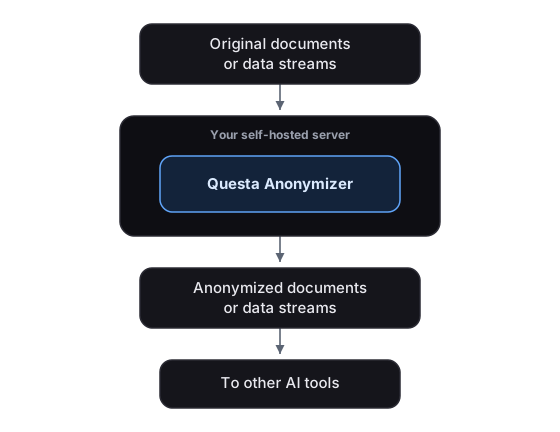
Option 1 — Host on your existing self-hosted server
Best for data sovereignty and operational cost.
You already run a self-hosted server and host Questa Anonymizer there.
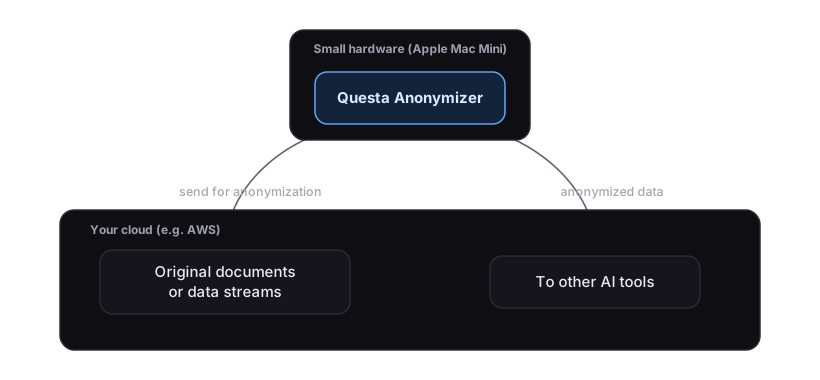
Option 2 — Run your workloads on the cloud, but host the Anonymizer on a small Mac Mini
Highly recommended for data sovereignty and lower operational cost vs. running the Anonymizer in the cloud.
You host on the cloud (AWS, GCP, Azure) but buy a small Apple Mac Mini to host the Anonymizer.
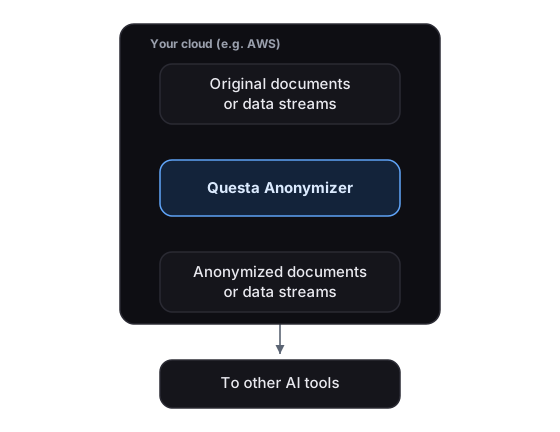
Option 3 — Host everything on the cloud
Easy to start, but higher cloud cost in the long run.
You host on the cloud (AWS, GCP, Azure) and run the Anonymizer there too.
Economics and other considerations
This table indicates the parameters you should consider when installing the Anonymizer.
| Feature | Self-Hosting Questa | Cloud-Hosting Questa |
|---|---|---|
| Infrastructure Control | Full control over hardware and software. | Managed by the provider. |
| Initial Cost | If already self-hosted, no cost. If buying, from $799 for an Apple Mac Mini. | Minimal upfront cost of AWS or similar services. |
| Operational Cost | Zero additional cost for running your own server or an Apple Mac Mini. Much more profitable in the medium to long term. | Slightly higher monthly cost for running in the cloud. A few hundred dollars per month for the same volume handled by a Mac Mini. |
| Setup | Relatively slow, as hardware needs to be procured and configured. | Faster (instant provisioning). |
| Scalability | A Mac Mini can process thousands of PDF, Word, and similar files per day — sufficient for a medium-scale organization. More volume needs more hardware upgrades. | High scalability with pay-as-you-go. But cost is relatively higher. |
| Maintenance & Updates | Requires someone moderately knowledgeable in SysAdmin. | Handled by the cloud provider (still need SysAdmin). |
| Security & Compliance | Full control and data sovereignty in the truest sense. | Basic compliance is done, but data still sits on hyperscalers. |
How to get it
Self-hosting requires a commercial license, issued per instance. When you purchase a license we provide:
- the license key,
- the deployment package, and
- complete setup, configuration, and operations instructions tailored to your environment (including air-gapped and high-availability deployments).
To discuss licensing and production deployment, contact techsupport@questa.solutions.
Next: FAQ